Staff rosters that stay within the law, done in minutes.

Scheduling software for South African shift work. Build the week, check it against the BCEA and hand payroll the hours.

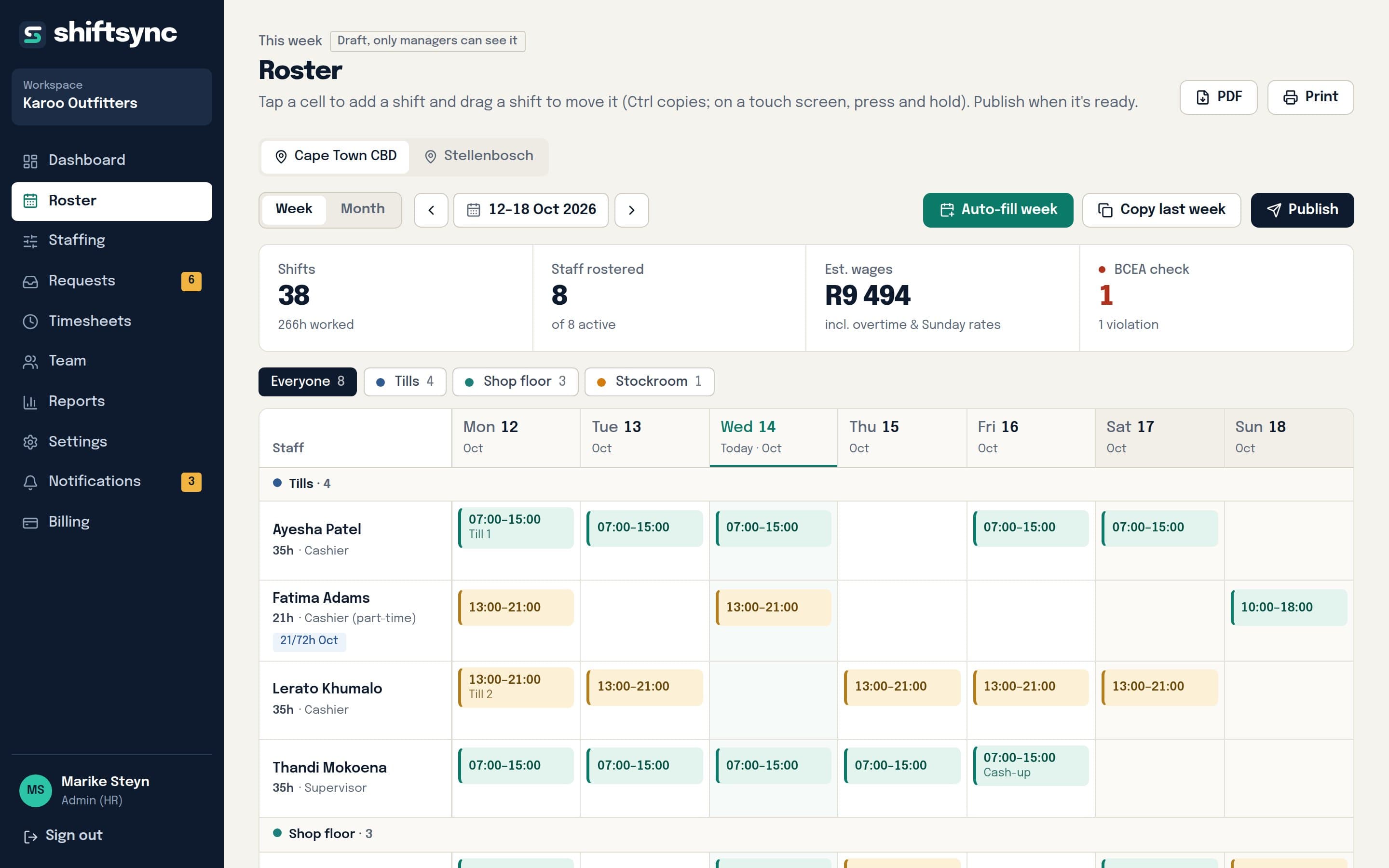
The weekly roster in ShiftSync: auto-fill and publish, the week's totals with one BCEA problem, and each person's shifts by day
The weekly roster in ShiftSync: each person's shifts by day, early shifts in teal and late shifts in marigold
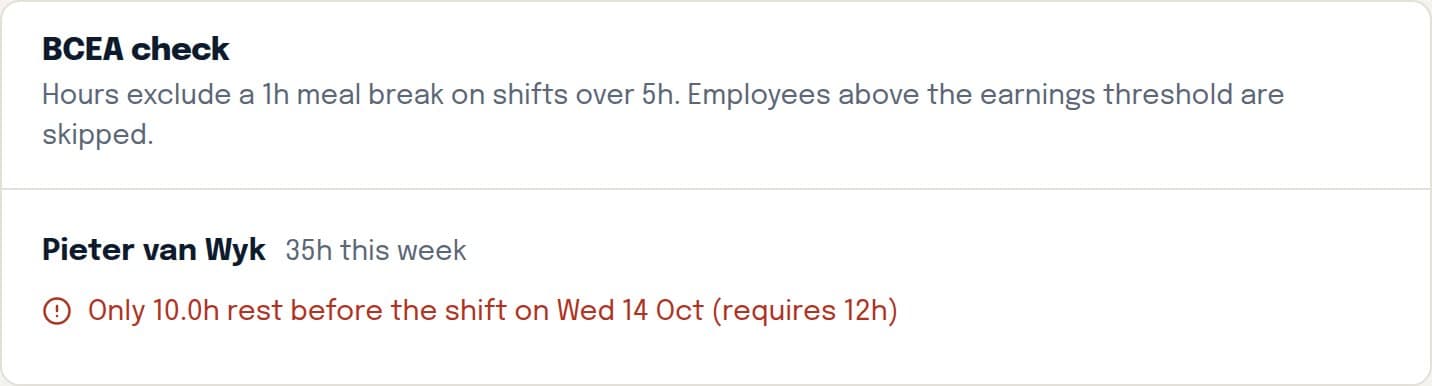
A BCEA check: Pieter van Wyk has only 10 hours' rest before his shift on Wednesday, where 12 are required
  • Checked against the BCEA and sector rules
  • POPIA-aligned, data hosted in the EU
  • Month to month, cancel any time
  • Demo needs no sign-up or card

A roster for every kind of shift work.

Day trade, split shifts or round the clock. Each sector's typical pattern, on one 24-hour clock.

  • Retail08:00–21:00
  • Restaurants and hotels11–15, 18–23
  • Clinics and frail care24/7, 3 shifts
  • Security24/7, 3 shifts
  • Call centres08:00–17:00
  • Warehousing06–14, 14–22

Day shift Late or evening shift Night shift

2½ h → 30 min

Time a manager spends on the weekly roster once auto-fill does the first draft.

25% to 200%

The fine on top of back pay when overtime or Sunday premiums are underpaid (BCEA Schedule 2).

0 installs

Staff see shifts, ask for leave and clock in from any phone browser.

Everything between the roster and payday.

Leave, days off and swaps stop living in WhatsApp

Requests arrive in one list with the balance and the roster beside them. Approve a swap and the shift moves; approve leave and the balance updates.
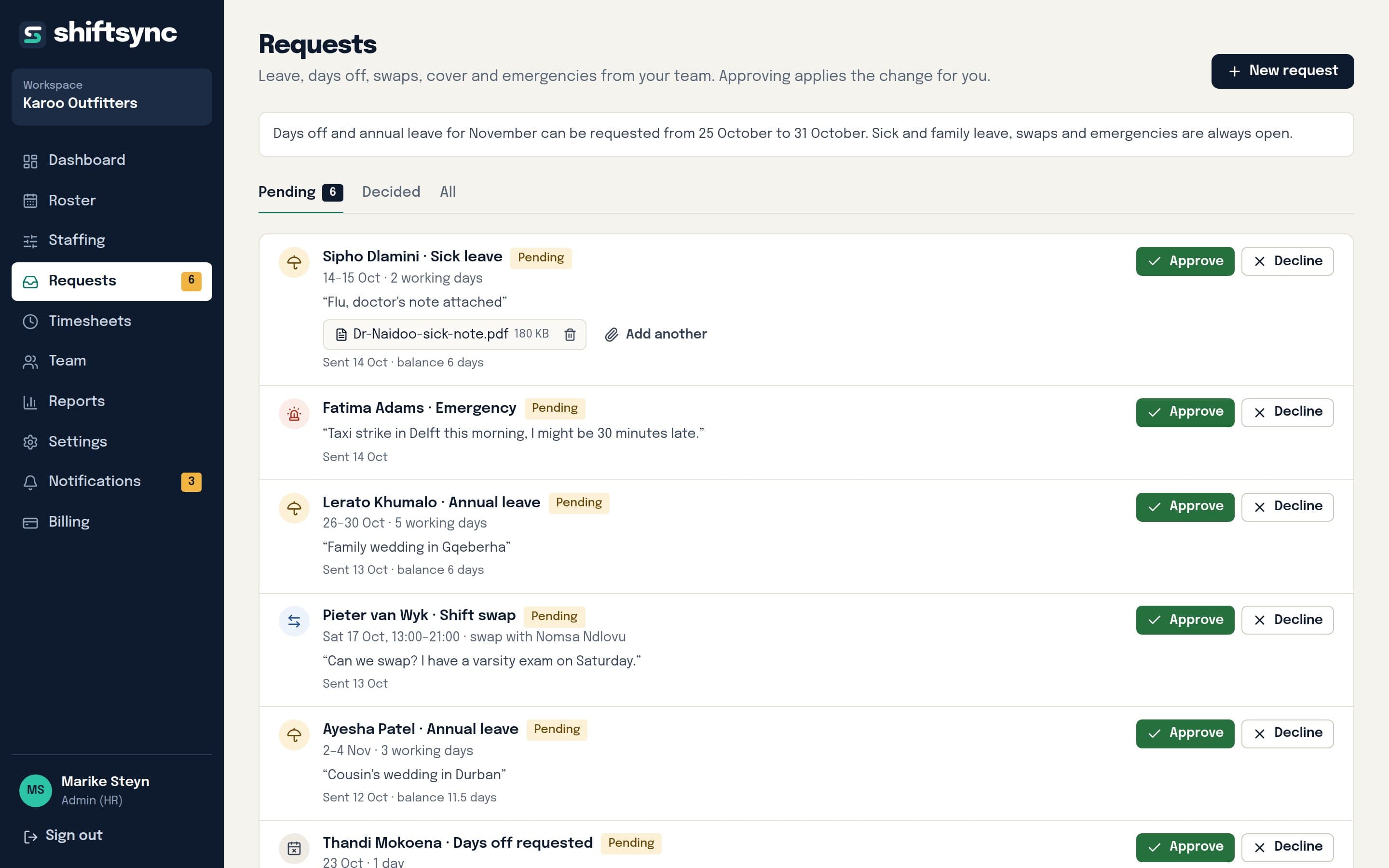
The requests page with sick leave, an emergency, annual leave and a shift swap waiting for approval

Problems show up before you publish

Too little rest between shifts, too many hours, a sixth day in a compressed week: each is flagged with the person and the day, so you fix it before anyone works it.

  • Rest periods, overtime and weekly limits
  • Sundays, public holidays and night hours counted separately
  • Pay rates checked against the national minimum wage

Auto-fill the week

Set how many people each shift needs. ShiftSync fills the hardest gaps first, keeps to leave and days off, shares weekends fairly and tells you what it couldn't fill.

  • Staffing levels per shift and weekday
  • Special days like month-end and public holidays
  • Plan and publish a whole month at once

Clocked hours next to rostered hours

See who is on the clock, who was late and where the hours differ from the roster, then approve the week in one go for payroll.
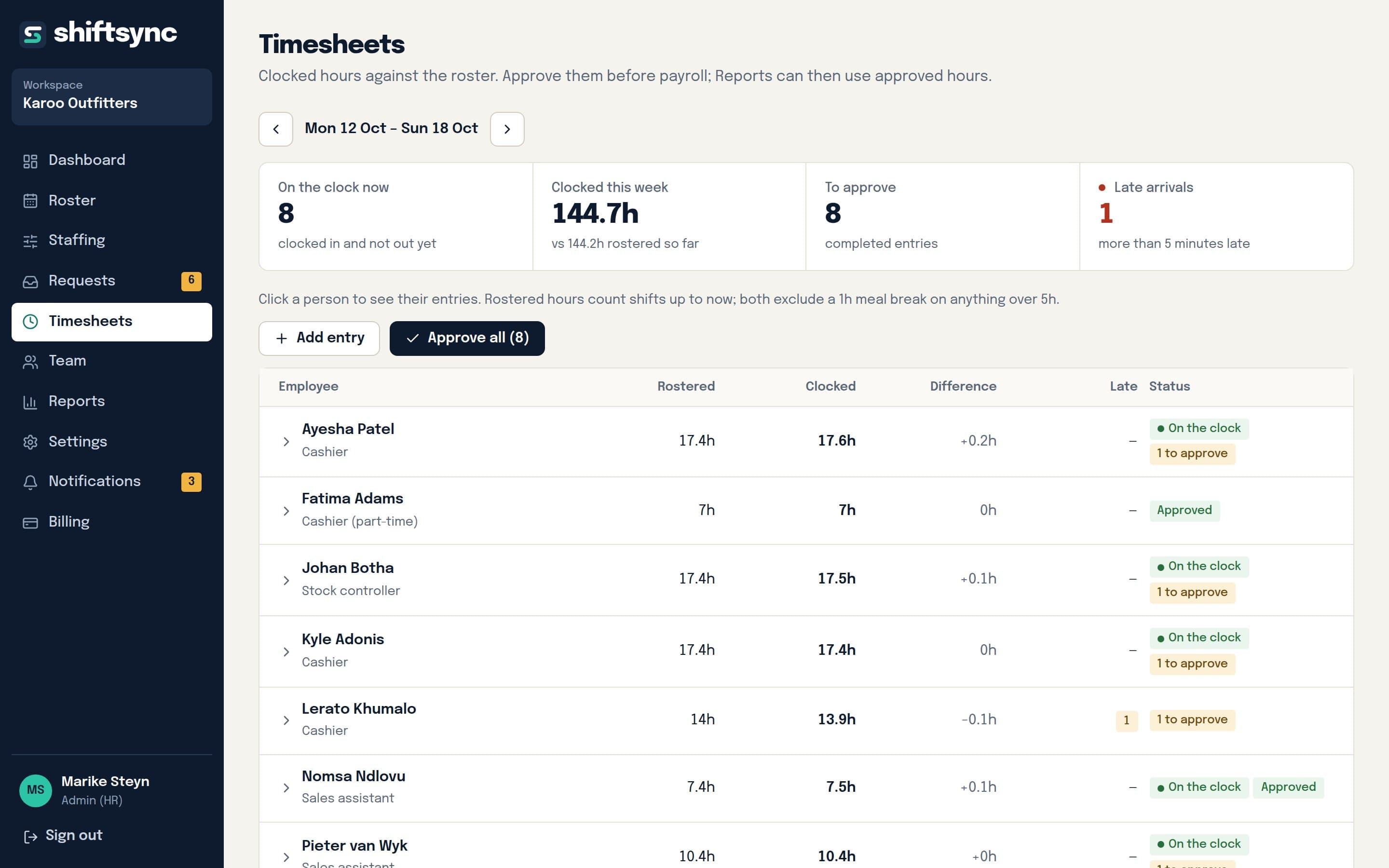
Timesheets comparing rostered and clocked hours per employee, with who is on the clock and who was late

No email address. No app store. Just a PIN.

HR gives each person a username and PIN. They sign in on any phone, add ShiftSync to their home screen, and get a notification when the roster is published.
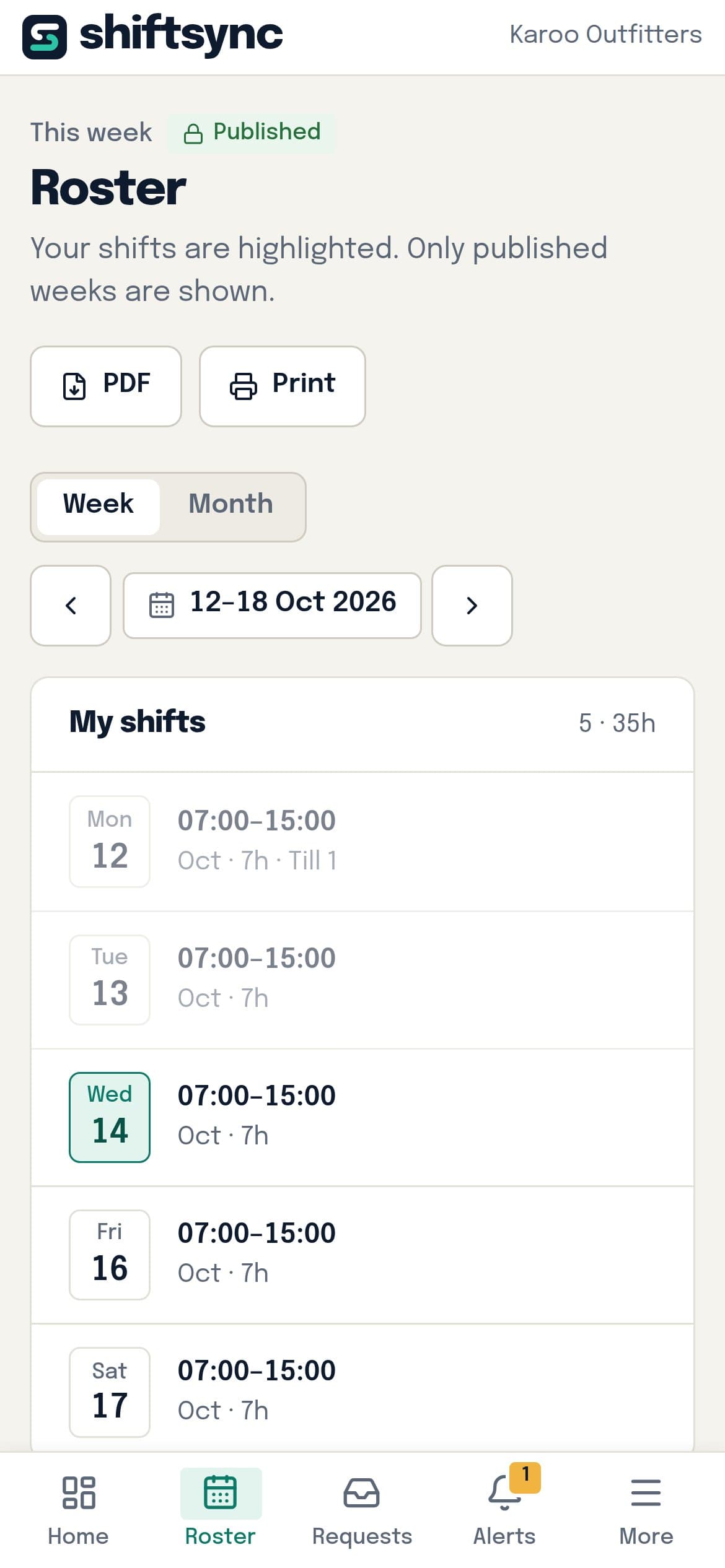
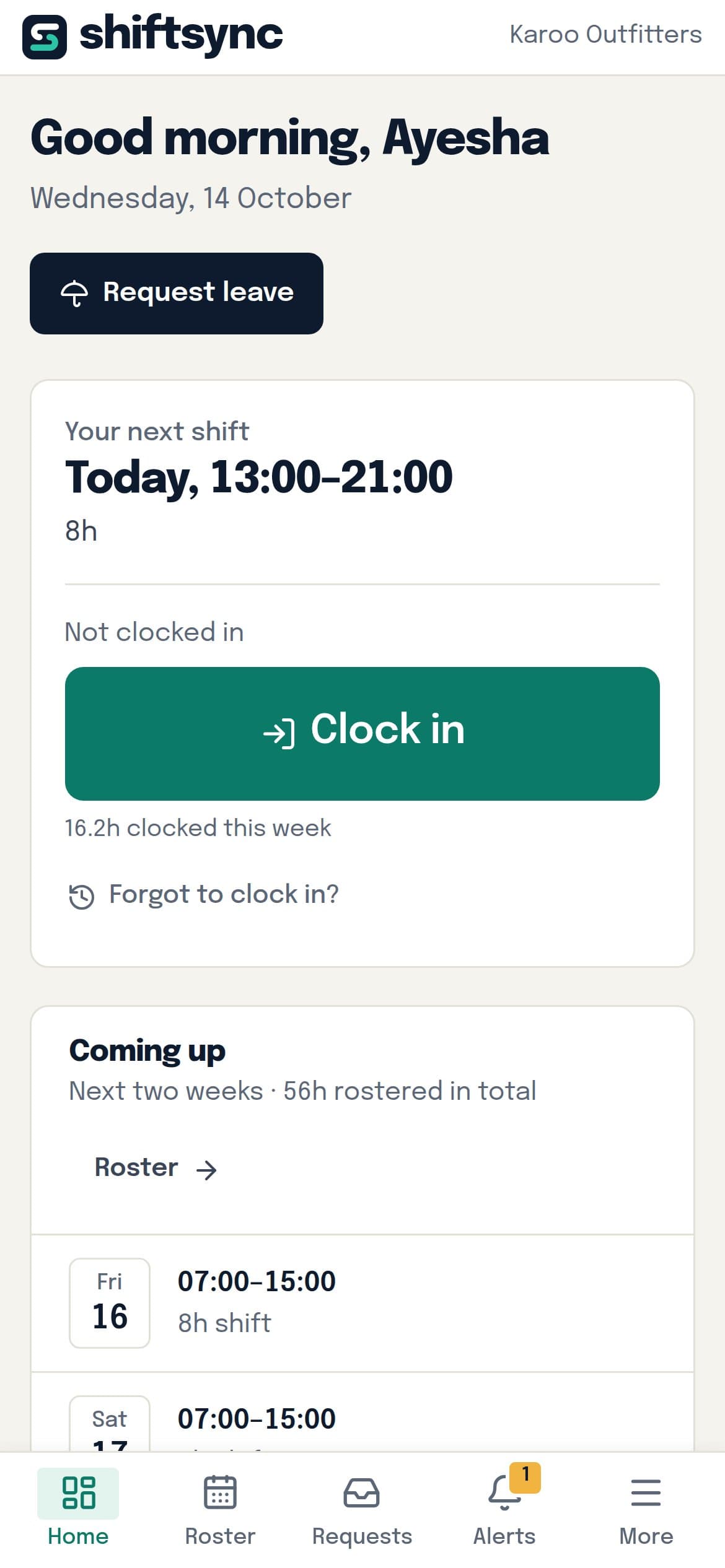
  • Clock in and out, with late arrivals flagged
  • Their next two weeks and leave balances
  • They never see wages or other people’s details
Read about every feature and what it saves
The published roster on an employee's phone, with their own shifts
An employee's phone: today's shift and the clock-in button

Month to month. Cancel any time.

One monthly price per business, by team size. No per-user fees and no setup costs.

In every plan

  • Rosters with BCEA checks, drag and drop, PDF
  • Leave, days off, swaps and sick notes
  • Clock in and out on phones, timesheets
  • Hours report and CSV export for payroll

Starter

A single shop, restaurant or small practice.

R699/month

  • Up to 15 active staff
  • 1 location
  • No auto-fill or staffing levels
Start with Starter

Pro

Large teams, 24-hour operations, several sites.

R2 999/month

  • Up to 150 active staff
  • Unlimited locations
  • Everything in Business
Start with Pro

Prices include VAT where applicable and are billed monthly by card through Paystack. Change plan or cancel any time from Billing.

Compare every feature
Feature
Starter
R699 /month
A single shop, restaurant or small practice.
Start with Starter
Business
R1 499 /month
Busy sites with several areas or wards.
Start with Business
Pro
R2 999 /month
Large teams, 24-hour operations, several sites.
Start with Pro
Size
Active staffup to 15up to 150
Locations1Unlimited
In every plan
Rosters with BCEA checks, drag and drop, PDF
Leave, days off, swaps and sick notes
Clock in and out on phones, timesheets
Hours report and CSV export for payroll
For bigger teams
Auto-fill the roster–
Staffing levels per day and special days–
Hours and pay report as PDF–
Pay and leave balances locked to HR–

What people ask before they start

Do my staff need an email address or an app?
No. HR gives each person a username and a PIN. They sign in on any phone's browser, choose their own PIN, and can add ShiftSync to their home screen so it opens like an app, with notifications about their shifts.
Can we plan a whole month at once?
Yes. Switch the roster to Month to see everyone's month on one screen, auto-fill every draft week of the month from your staffing levels, and publish the month in one go. Staff get one notification.
What if someone forgets to clock in?
They add the hours from their phone with an explanation, and a manager approves or declines it before payroll. HR can also switch clocking in off if you record hours another way.
Which BCEA rules does it check?
Ordinary hours per day and week, overtime limits, 12 hours' rest between shifts, 36 hours' weekly rest, compressed working weeks, Sunday and public holiday work, night work and the national minimum wage. Staff above the earnings threshold are treated correctly. Sectoral determinations and bargaining council agreements can differ, so treat the checks as a safety net rather than legal advice.
Can we try it with our own team before paying?
Open the live demo to see a business already set up. When you create your own workspace you choose a plan and pay by card through Paystack; you can cancel any time from Billing.
What happens with sick notes?
Staff attach a photo or PDF when they ask for sick leave, or afterwards. Only the employee and their managers can open it. More than two days in a row without a certificate is flagged, as the BCEA allows you to ask for one.
We have more than one site. Does that work?
Yes. Each location has its own roster, staffing levels and reports. Managers only see the locations they run, and an HR admin sees everything. Business covers three locations; Pro has no limit.
Can payroll use what comes out of it?
Reports split each person's hours into ordinary, overtime, Sunday, public holiday and night hours, with a pay estimate. Download a CSV for your payroll system or a PDF to sign off.

Something else? Email support@shiftsync.co.za

Try it with a business that's already running.

Pick one and get a private copy with staff, three weeks of rosters, leave requests and clocked hours. Switch between the manager and employee views as you go.