Features and benefits

Less time on rosters, and fewer mistakes that cost money.

ShiftSync builds your rosters, checks them against the Basic Conditions of Employment Act, handles leave, swaps and sick notes, lets staff clock in on their phones and gives payroll the hours it needs.

What it saves a typical business

A business with 20 shift staff at one location. These are estimates; put in your own numbers below.

13 hours

of manager time back each month, about 20 working days a year.

R1 950

a month, valuing that time at R150 an hour. Business costs R1 499.

R30 240

a year in back pay and fines at worst, if one in five staff miss one premium a month.

Work it out for your business

Everything is calculated in your browser. Nothing is sent to us.

Your business

R
R
Manager time saved
13 hours a month
8.7 h on rosters, 1.7 h on requests and 2.7 h on timesheets and payroll
Value of that time
R1 950 a month
R23 400 a year, against Business at R1 499 a month, about 1.3 times what it costs.
Underpayment risk the BCEA checks help you avoid
R12 600–R30 240 a year
R10 080 in back pay owed, plus a fine of 25% to 200% of it if an inspector finds it (BCEA Schedule 2).

Estimates from your numbers, not a guarantee. Assumes a manager spends 2.5 h a week on each roster by hand, about 0.5 h with auto-fill (Business and Pro) and 1.25 h without it (Starter); 6 min per person a month on leave and swaps by message, and 10 min per person a month adding up hours for payroll. A missed premium is the average of 4 overtime hours at ordinary pay, or an 8-hour Sunday or public holiday without the extra pay.

Everything in ShiftSync

What it does, in detail

Rosters in minutes, not evenings

A weekly grid per location that fills itself and fits every screen.

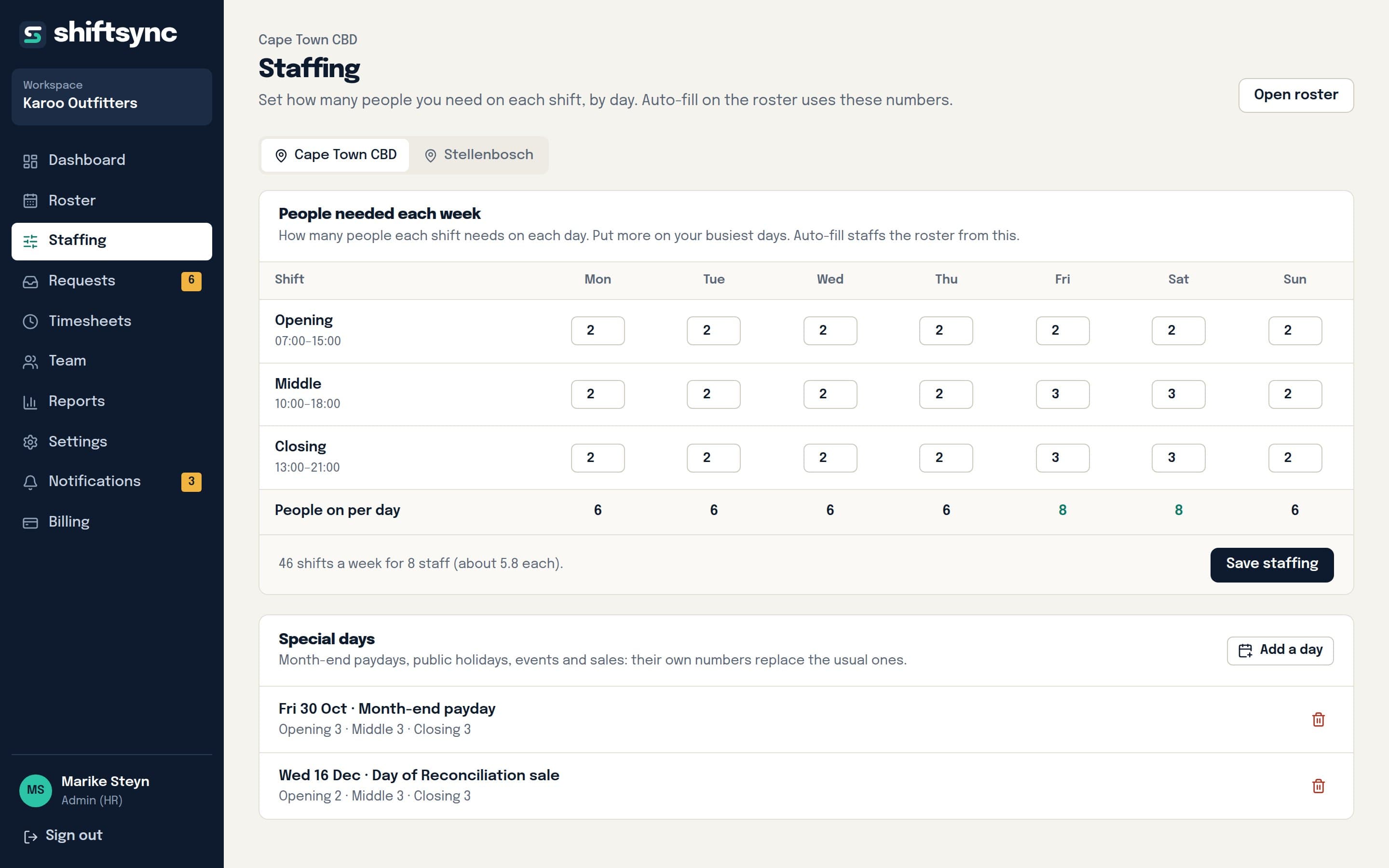
  • Auto-fill builds the week from how many people each shift needs, day by day, and explains any gap it can't fill.
  • It fills the hardest shifts first and respects leave, requested days off, days people can't work, positions, days per week and contracted monthly hours.
  • Hours and weekends are shared fairly over the last four weeks.
  • Shift templates, copy last week, and drag and drop (press and hold on a tablet or phone).
  • Overnight and split shifts, areas (wards, sections, sites) and notes.
  • Week and month views: jump to any date, plan a month on one screen, auto-fill and publish a whole month at once.
  • Publish when it's ready: staff only see finished rosters. Print or download as PDF.
BCEA compliance built in

Problems are flagged on the roster before you publish, not after an inspection.

  • Daily and weekly hour limits, overtime caps and the 45-hour week.
  • 12 hours' rest between shifts and 36 hours' weekly rest, split-shift aware.
  • Compressed working weeks (12-hour shifts on up to 5 days, s11).
  • Sunday, public holiday and night work (18:00–06:00) counted separately for pay.
  • Pay rates below the national minimum wage (R30.23/h) flagged.
  • Staff above the BCEA earnings threshold are handled correctly.

Leave, days off and swaps without the WhatsApp chaos

Requests arrive in one place and approving them updates everything.

  • Annual, sick, family responsibility and unpaid leave with live balances; weekends and public holidays aren't counted.
  • Annual leave can accrue automatically every month.
  • A month-end window for next month's days off and planned leave, so the roster starts from what people need.
  • Swaps and cover: approve and the shift moves to the colleague.
  • Emergencies ("taxi strike, I'll be late") reach the manager straight away.

Sick notes, kept safely

No more photos lost in someone's phone.

  • Staff attach a photo or PDF of the medical certificate when they ask for sick leave, or later for days already taken.
  • Sick leave of more than two days in a row without a certificate is flagged (BCEA s23).
  • Only the employee and their managers can open it.

Clock in and out on their phones

Rostered versus actual, without a clocking machine.

  • Staff clock in and out from the app on any phone, or HR switches clocking off if you record hours another way.
  • Forgot to clock in? Staff add the hours with an explanation and a manager approves or declines them.
  • Managers see late arrivals, early finishes and missing clock-ins against the roster.
  • Add or correct entries and approve a whole week in one go.

Hours ready for payroll

The split payroll needs, per person, without a calculator.

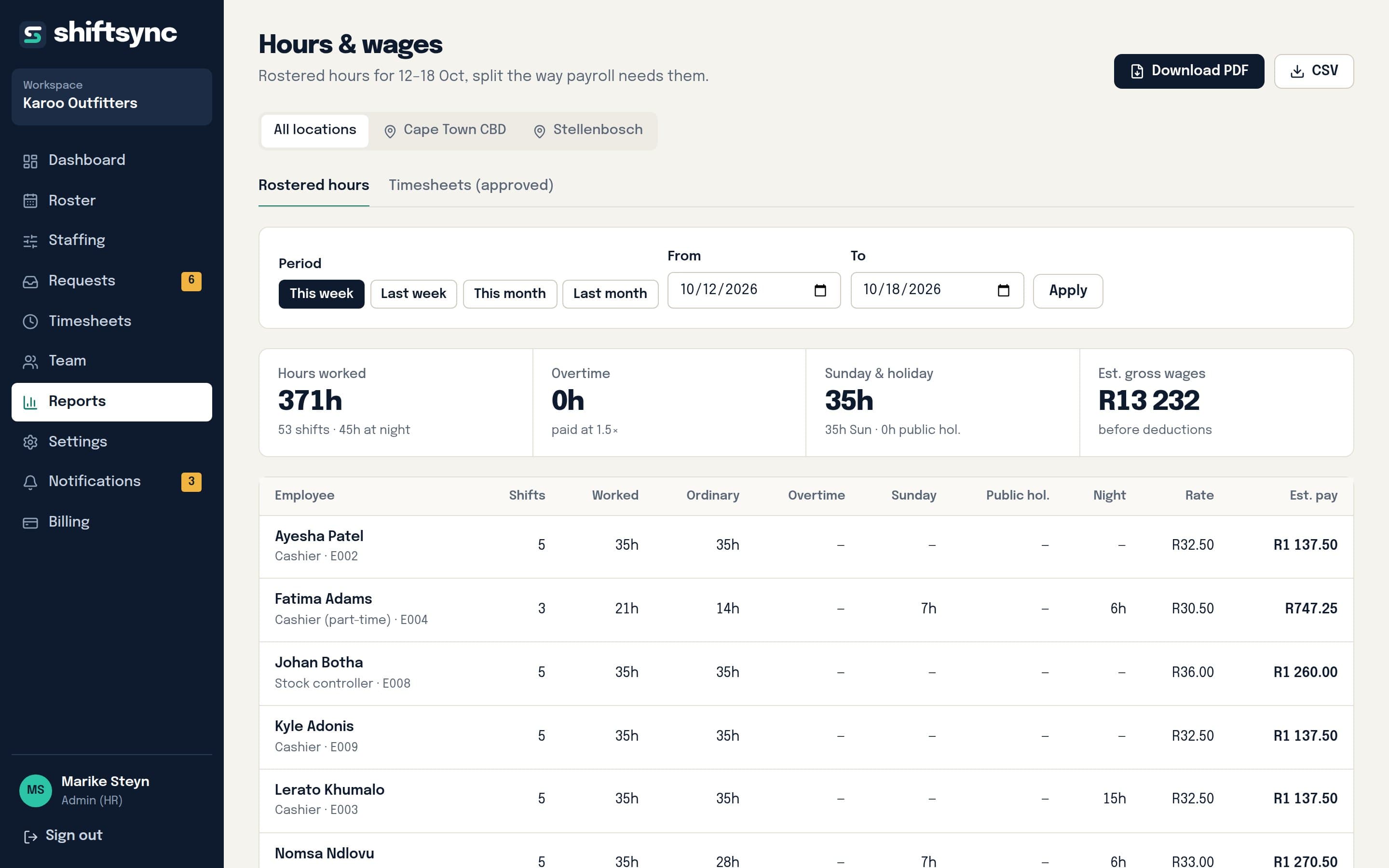
  • Ordinary, overtime, Sunday, public holiday and night hours per employee.
  • Estimated gross pay with the BCEA multipliers (overtime 1.5×, Sundays and public holidays 2×).
  • From the roster or from approved timesheets, per location or for the whole business.
  • A signed-off PDF report with leave taken, timesheet exceptions and BCEA issues, or a CSV for your payroll system.

Several locations, clear responsibilities

Built for owners with more than one site.

  • Each location has its own roster, staffing levels and reports.
  • Managers are assigned to one or several locations and only see those.
  • An Admin (HR) role sees everything and can keep pay rates and leave balances to HR only.
  • Part-time and casual staff get contracted monthly hours that auto-fill stays within.

An app your staff will actually use

No email and nothing to install: HR gives each person a username and PIN.

  • Their next shift, the next two weeks and their leave balances on one screen, with a tab bar for the main places.
  • Add it to the home screen to open it like an app and get notifications when the roster or their shifts change.
  • The published roster with their own row highlighted.
  • Leave, swap and cover requests in a few taps, with big buttons for touch screens.

Say how many people you need. Auto-fill does the rest.

Set the people needed per shift for each weekday, and for special days like month-end or a public holiday. Auto-fill staffs the week around leave, requested days off and rest periods, shares weekends fairly and tells you which gaps it couldn't fill.

Staffing levels per shift and weekday

Hours split the way payroll needs them

Ordinary, overtime, Sunday, public holiday and night hours per person, with estimated pay using the BCEA multipliers. Use rostered hours or approved timesheets, per location or for the whole business.

The hours and pay report: ordinary, overtime, Sunday, public holiday and night hours per person

Compliance

Why BCEA compliance is worth money

What a mistake costs

  • Unpaid overtime, Sunday or public holiday premiums are owed back to the employee, and a labour inspector can order payment.
  • Fines for underpayment range from 25% to 200% of the amount owed, rising with each repeat (BCEA Schedule 2, Table Two).
  • Other failures, like rest periods or records, carry fines of R300 to R1 500 per affected employee (Schedule 2, Table One).
  • Employees can also refer unpaid amounts to the CCMA (s73A), which takes management time too.

What ShiftSync does about it

  • Checks every roster for hours, overtime and rest before it's published.
  • Counts Sunday, public holiday, night and overtime hours separately, so the premium is paid.
  • Knows South African public holidays, including the rule for holidays on a Sunday.
  • Keeps rosters, timesheets, leave and sick notes on record for an inspection.

Who it helps

Benefits for everyone involved

Owners and directors

  • Lower risk of back pay, fines and CCMA claims from overtime, Sunday and public holiday mistakes.
  • Wage costs visible before the week starts, per location.
  • Records of rosters, hours and leave kept in one place (the BCEA asks for three years).

Managers

  • Hours back every week: the roster fills itself and requests don't live in WhatsApp.
  • Fewer phone calls about who's working and fewer no-shows.
  • Problems flagged before publishing, not discovered on payday.

HR and payroll

  • Hours split exactly the way payroll needs them, with a PDF to sign off.
  • Leave balances that update themselves and sick notes on file.
  • Control over pay rates and leave, even with many managers.

Employees

  • Their roster on their phone as soon as it's published.
  • Ask for days off and leave without chasing anyone.
  • Fair hours and weekends, and rest periods respected.

Made for South African shift work

Wording, shift templates and staffing adapt to your industry: wards and 12-hour days for nursing, split shifts for restaurants, posts and night shifts for security.

Retail and supermarketsRestaurants, hotels and hospitalityClinics, nursing and frail careSecurity companiesCall centresWarehousing and logistics

Your data, kept separate

  • Every business's data is kept apart by the database itself, not just the app.
  • Staff never see wages, other people's leave or contact details, or draft rosters.
  • Managers only see the locations they run; sick notes only reach the right people.
  • Pay monthly by card through Paystack. Cancel any time.

See it with a real team before you decide.

Open a private demo with staff, rosters, leave and clocked hours already in it, and switch between the manager and employee views. No sign-up.

Where the numbers come from

  • Time spent on rosters: a QuickBooks survey found managers spend about 2.5 hours a week making staff schedules. The other time savings are our estimates for handling requests and payroll by hand.
  • Fines: Basic Conditions of Employment Act 75 of 1997, Schedule 2 (Tables One and Two). Sick-note rule: s23. Records: s31. Pay multipliers: ss10, 16 and 18. National minimum wage: R30.23 an hour from 1 March 2026.
  • All savings are estimates for planning, not guarantees, and this page isn't legal advice. Sectoral determinations and bargaining council agreements can set different rules.
  • ShiftSync is a trading name and division of OTK Industries (Pty) Ltd.